
The biggest CRM mistake sales teams can make is treating an AI-native CRM as a CRM with AI bolted on.
They sound the same. They aren't.
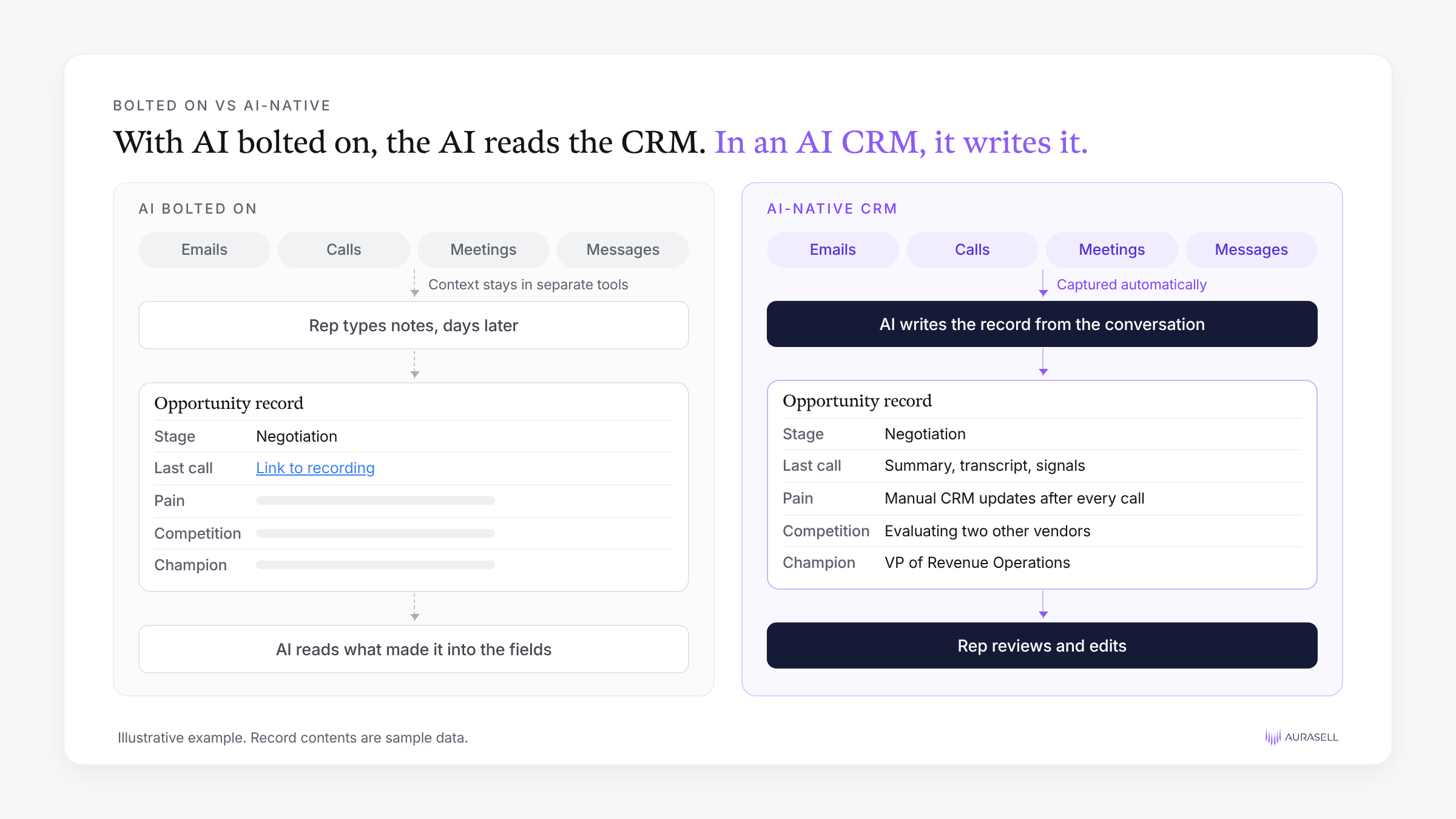
With AI bolted on, the AI reads the CRM. In an AI-native CRM, the AI writes it.
That one difference decides everything downstream: what context the AI can see, how current your data is, how much your reps type, and whether your forecast reflects what buyers actually said.
I run Growth at Aurasell, so I spend most of my week inside pipeline data.
This post covers what "bolted on" looks like in practice, and how to roll out an AI CRM so you don't repeat the old CRM with a chatbot on top.
What "bolted on" looks like
A bolted-on setup is a legacy CRM, like Salesforce or HubSpot, with an AI layer added afterward (enter... ClaudeForce).
That layer might be the vendor's own assistant, a third-party add-on, or ChatGPT, Claude, or Grok connected to the CRM through MCP.
It feels powerful because you can ask questions in plain English. But the model is still querying the same records your reps typed in by hand. It can summarize the CRM. It can't see anything the CRM never captured.
An AI-native CRM works the other way around.
The system captures the conversations, emails, and activity first, and the AI writes the record from them. The rep reviews it instead of typing it.
The AI only knows what the CRM holds
The biggest difference I've seen between an AI-native CRM and a legacy CRM with AI bolted on is simple: in the bolted-on version, you only get the benefit of the data the CRM already has.
And in most legacy CRMs, that isn't much. Even teams with Gong or another call recorder integrated usually don't get the transcript into the CRM. They get a field with one or two data points, or a note that says "call happened," with a link to the recording. The context of the deal lives somewhere else.
"But we can connect the data via the MCP".
Where does that data live? How do you join that data? How much does it cost every time you want to run a query to do analysis across those different toolsets?
Forecasting is where this hurts most.
Whether you commit a deal this quarter depends on a lot of signals: the emails, the recorded calls, other outbound activity, even text messages.
In Salesforce forecasting or a tool like Clari, someone has to pull that context in from all those places. In practice, the commit call gets made on whatever made it into the fields.
An anonymized dataset we reviewed shows just how much that context matters.
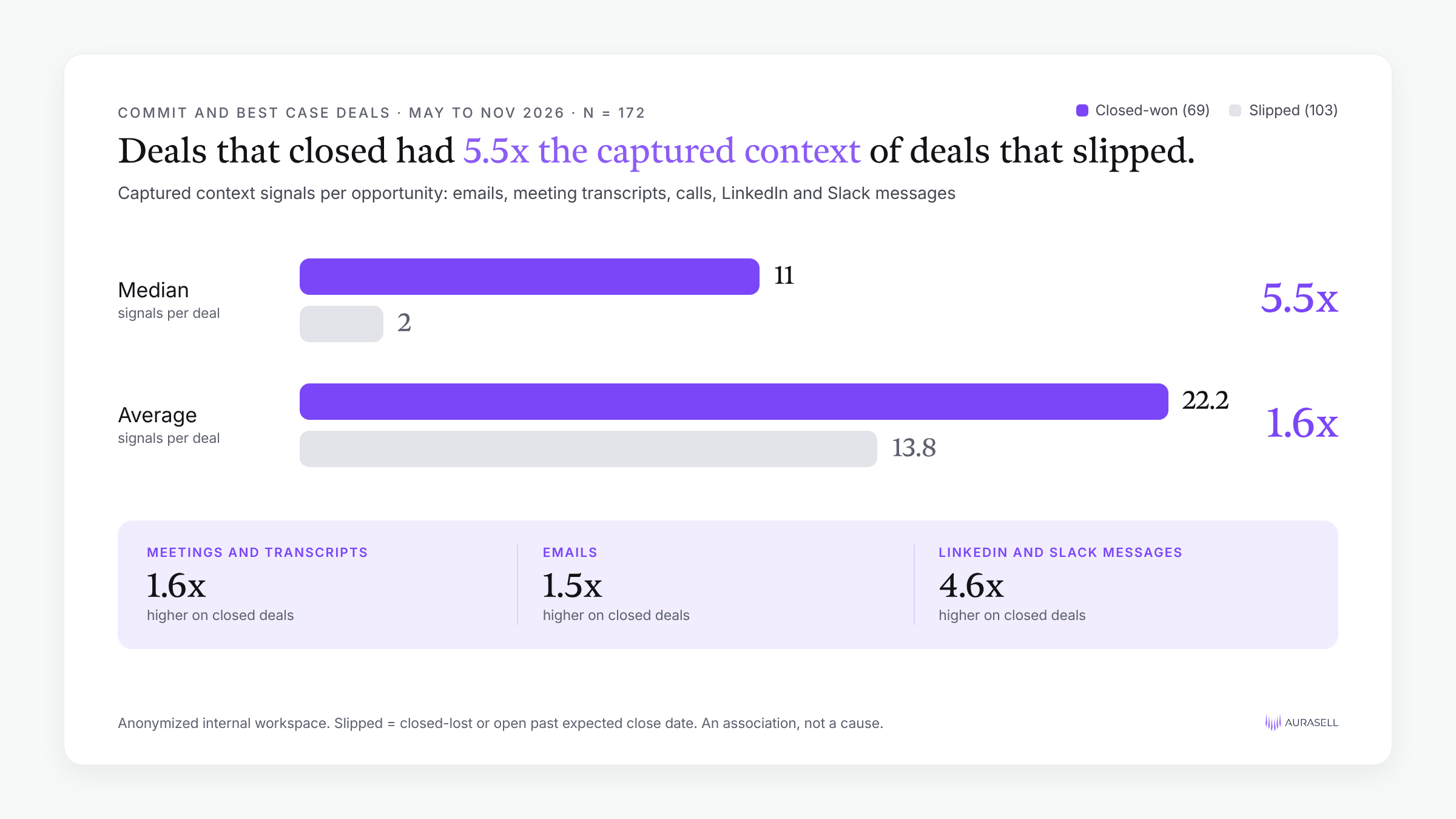
We looked at 172 opportunities that sat in a Commit or Best Case forecast category and reached an outcome between May and November 2026.
69 closed-won and 103 slipped.
The gap held across signal types: meetings and transcripts were 1.6x higher on closed deals, emails 1.5x higher, and LinkedIn and Slack messages 4.6x higher.
That's an association, not proof that more context closes deals.
But it's exactly the context a bolted-on setup leaves outside the record, on the deals you're most likely to commit.
An AI-native CRM has to capture the conversations in the first place, so coverage matters. For our team, 98% of intended recordings were recorded, which means the AI is working from what buyers actually said on most deals, not from a rep's memory of it.
Coverage also tracks with completeness.
In an anonymized dataset of 473 open opportunities, deals where most meetings were recorded had 1.83x the MEDDPICC completion of deals where most weren't (28.4% vs 15.6% of fields filled with real content). That's an association, not proof of cause, but it matches what I see every week.
Your old fields aren't the mistake
A lot of teams carry every field over from their old CRM.
That's often called clutter, and in the anonymized dataset we analyzed it looks like it: 173 of 269 active custom opportunity fields (64%) are empty on more than 90% of open deals, and 86 are empty on every one.
I don't think carrying them over is the problem. Those fields are a record of what the team was trying to capture at some point. They tell you what leadership cared about, even if reps never had time to fill them in.
The better question is whether there's a better way to capture what they were after.
With automatic activity capture, an AI-native CRM can fill in the information those fields were meant to hold, from the conversations themselves, without asking reps to type more.
That doesn't always mean filling the old fields themselves.
On our team, the roughly 40 fields are still almost entirely empty. Auto-capture filled a newer set of AI-generated fields instead. So use the old fields as a brief: list what each one was trying to capture, and map it to something the AI maintains.
(This is a self-reminder that I need to work with RevOps to clean up some of those fields).
Ideate with AI, edit with the human
I'm of the school that you should always ideate with AI and edit with the human. The AI does the first draft. A person brings the judgment.
This post is an example. I used AI to interview me: it asked the questions that pulled out the points you're reading.
The same pattern works for a sales sequence.
Have the AI ask you who you're targeting, which titles and industries, and what the sequence and each email need to achieve. Then you shape the draft.
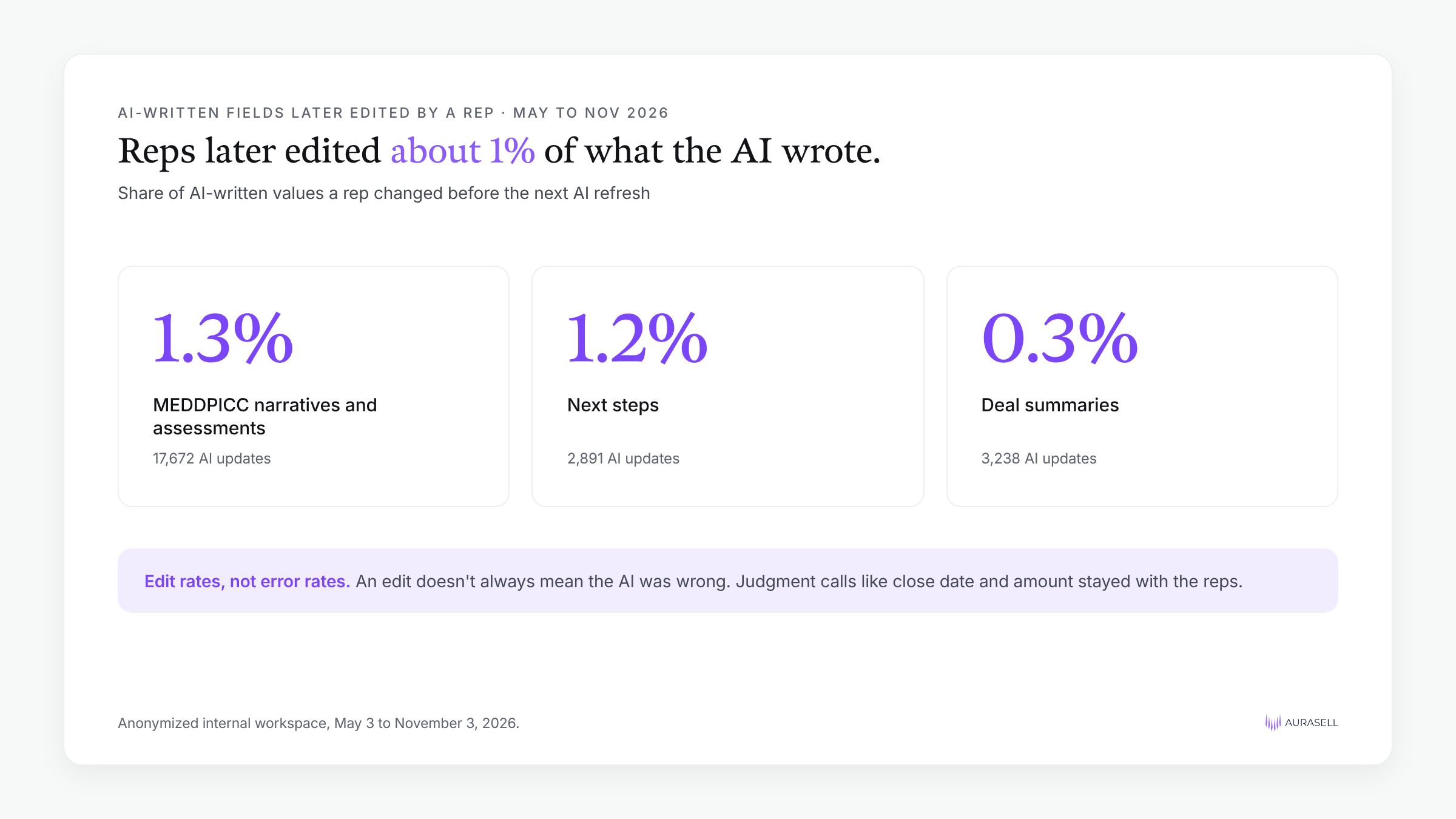
On deal records, the human edit turns out to be light.
Here's how often a rep later edited a field the AI had written, before the next AI refresh:
An edit doesn't always mean the AI was wrong, so these are edit rates, not error rates.
Judgment calls like close date and amount stayed with the reps.
The manual work that's left, and how to automate it
Even with the AI writing most of the record, reps still do some data entry by hand.
To see where, we looked at every opportunity update on our own team between September 1 and November 3, 2026.
Of 54,877 field updates, reps made 11.4% by hand. The AI, working on its own, made 79.6%.
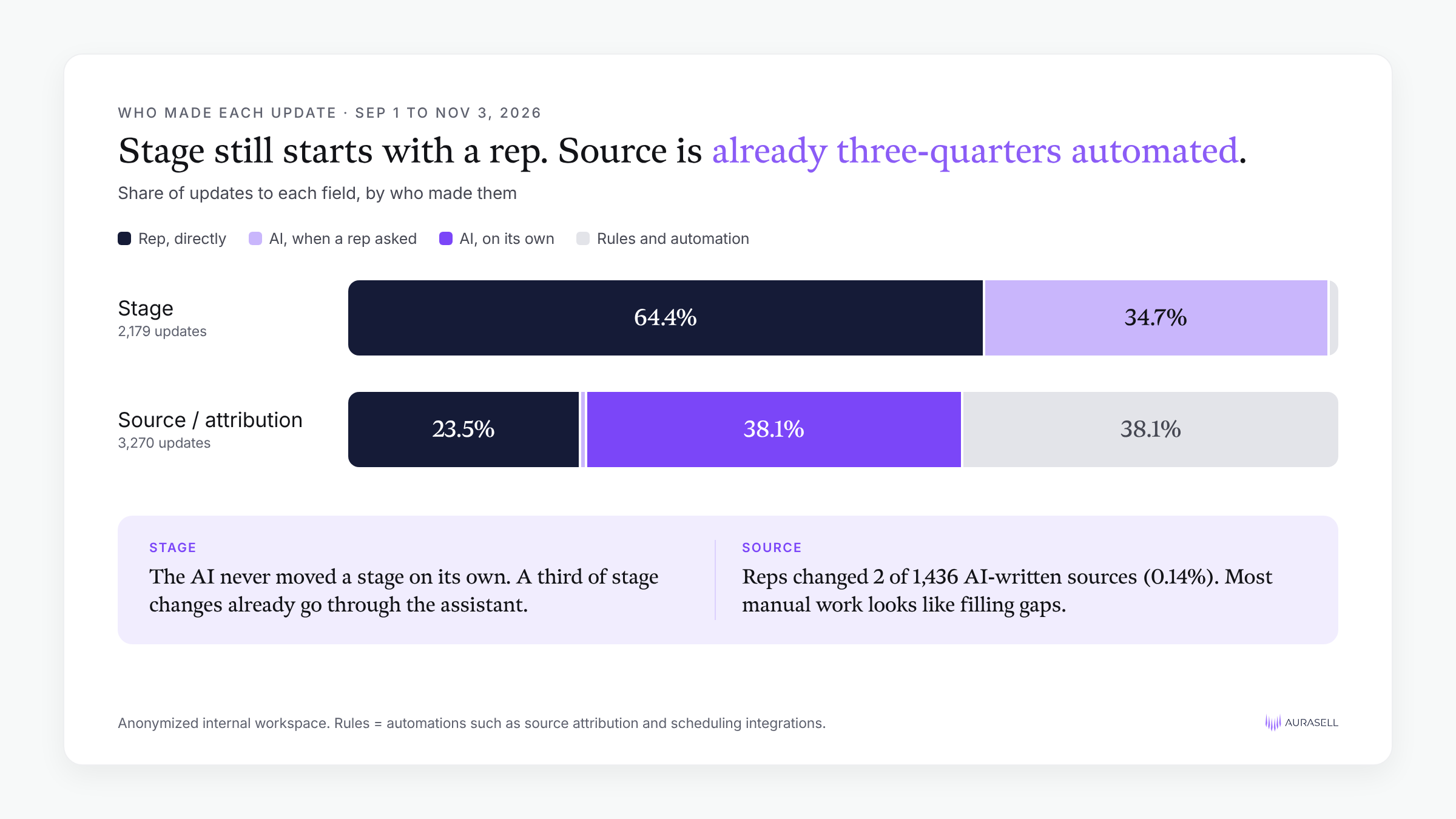
The manual work that's left is concentrated in a few fields. Here's how the sales team's 4,416 manual updates broke down:
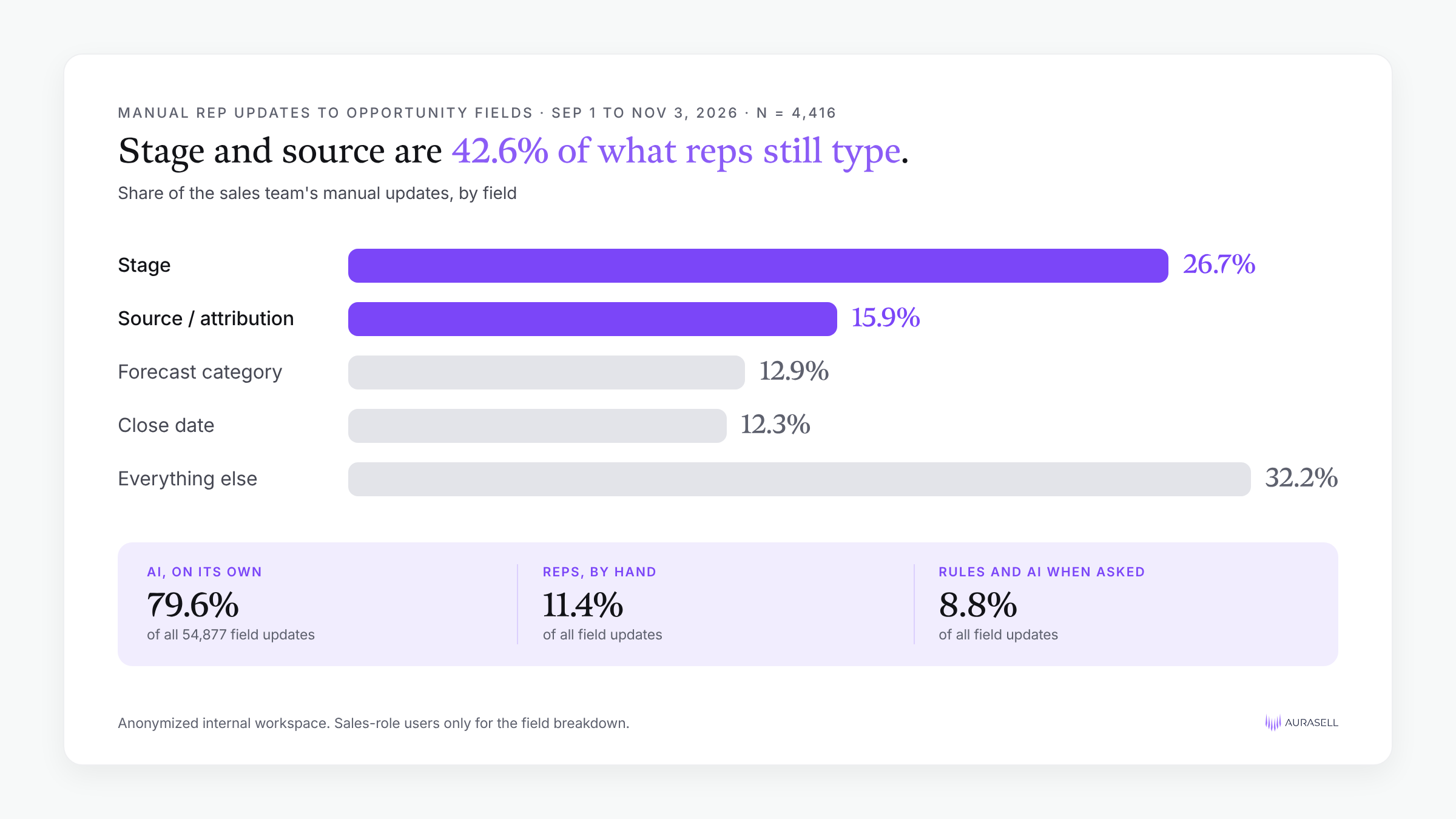
Stage and source alone are 42.6% of what reps still type. Both can be automated further.
Stage: let the conversation propose the move
The AI never moved a deal's stage on its own, so every stage change still starts with a person.
But about a third already go through the AI assistant: the rep asks, and the AI updates the record.
The next step is for the AI to propose the move itself.
An AI CRM that hears the calls and reads the emails knows when a stage's exit criteria are met: the demo happened, pricing came up, the security review started, the buyer agreed to a mutual action plan.
It can suggest the new stage with that evidence attached, and the rep approves it in one click.
Source: capture it at the first touch
Source is already mostly automated. Rules wrote 38.1% of source updates and the AI wrote another 38.1%. Reps wrote the other 23.5%, which still made source the second most common field they changed by hand.
When the AI did write the source, reps almost never changed it: 2 of 1,436 AI-written values were later edited (0.14%). That suggests most of the manual work is filling gaps, not fixing mistakes.
To close the gaps, capture source wherever it first shows up: the form fill, the sequence reply, the event list, the partner intro in an email thread, and the buyer's answer to "how did you hear about us?" on the discovery call.
Ask the rep only when two signals disagree.
Forecast category (12.9%) and close date (12.3%) are next on the list. Rules already set 50.8% of close dates.
An edit doesn't always mean the AI was wrong, so these are edit rates, not error rates. Judgment calls like stage, forecast category and amount stayed mostly with the reps.
Speed is the part people underrate
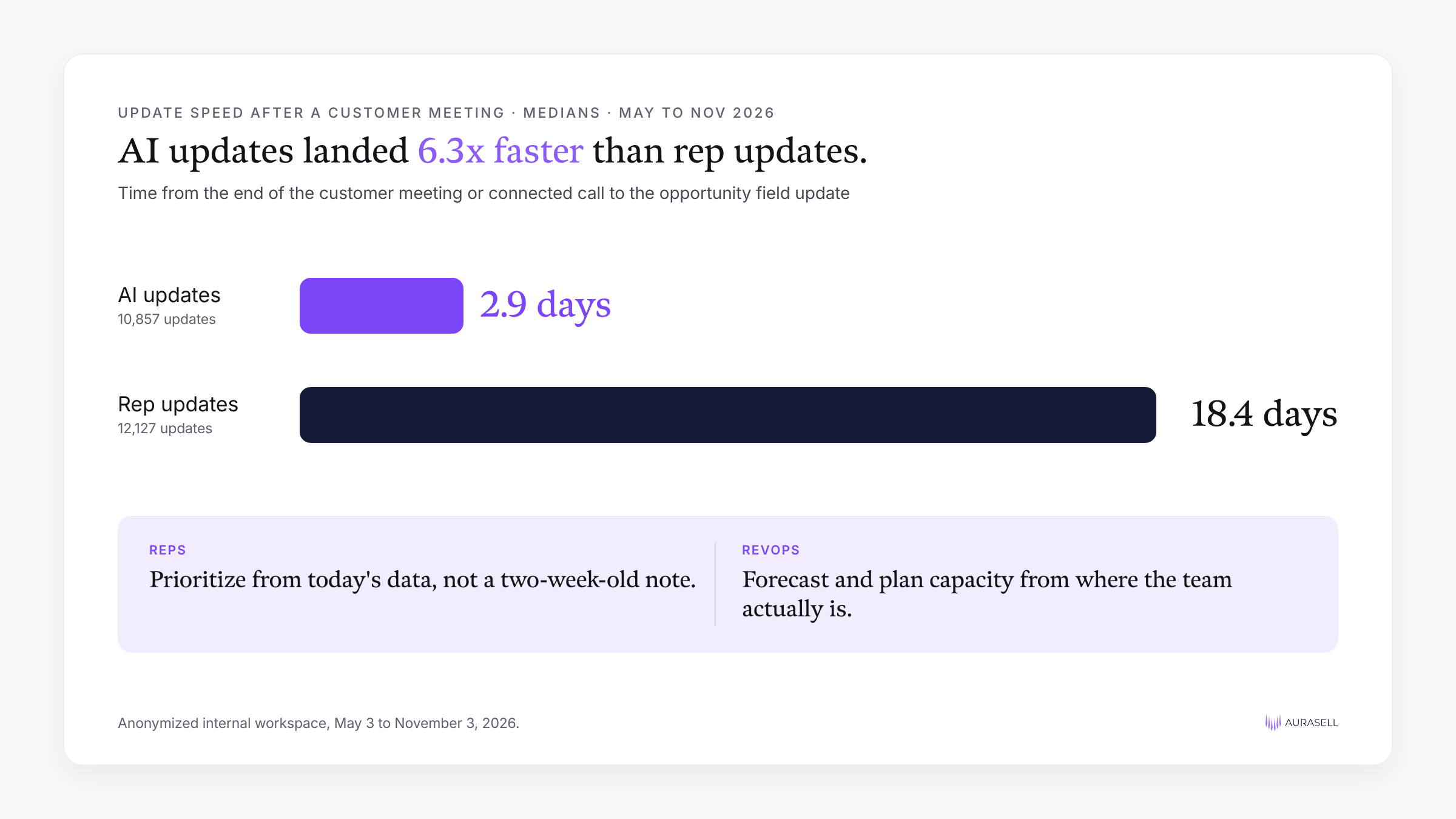
Based on the anonymized dataset we analyzed, AI updates landed a median 2.9 days after the customer conversation they came from.
Rep updates landed a median 18.4 days after.
That's about 6.3x faster (10,857 AI updates vs 12,127 rep updates, May to November 2026).
That speed changes two things.
- Reps prioritize better. I don't have to wait two weeks for a rep to update a record from a note, or from memory. Today's data is accurate today, so the AI can help reps decide what to work on.
- RevOps sees the real picture. When the data reflects where the team actually is, you can forecast better and update capacity planning and growth models with confidence.
The rollout mistake: turning AI on without process
Too many teams turn on AI and let reps run wild instead of setting process. Give every rep an AI tool with no guidelines and you'll end up with ten agents doing the same job ten different ways.
You still need structure around how you operationalize AI. RevOps and sales leadership should set the guidelines for usage, so sellers can do what they should be doing: selling.
Here's the order I'd roll out an AI CRM in, starting from scratch:
- Set the foundations. Decide how you'll manage accounts, opportunities, and contacts. Define your ICP, buyer personas, and TAM, so you know which accounts and contacts belong in the system.
- Build the operating model. Assign ownership with territory planning. Set quotas from how much revenue the business needs, and build the forecasting model that rolls up to it.
- Then add agents. Once reps, accounts, and contacts are in place, build agents for account prioritization, outreach prioritization, and triggered outreach to the right contacts.
- Layer on complexity last. Start with the foundations, then the operating model and processes, then everything else.
Stop making reps fill out the CRM
The habit to drop first is requiring reps to fill out their CRM. I can't understand why, in the current world, reps still use the CRM the way they used to. Filling out fields is simple enough that it should be captured automatically.
The same goes for heavier admin work. With the context it already has, AI should be able to build a business value assessment, and get a mutual action plan about 90% of the way there. Reps shouldn't have to do all of that by hand. RevOps can set this process for the whole organization: give sellers one simple pane of glass, and let them focus on selling.
How to tell if it's working
Measure sales productivity. In practice, that means tracking:
- Selling time per rep
- Meetings per rep
- Ramp time for new reps
- Sales velocity
- Forecast accuracy
- Pipeline generated per rep
- Revenue generated per rep
Pick two or three of these and record a baseline before you switch anything on. We rolled auto-capture out gradually, so we don't have a clean before-and-after line. A baseline and a fixed start date give you one.
The one question to ask before you buy
If you're buying an AI CRM, ask one question: is this CRM actually AI-native, or is it just a CRM you connect to ChatGPT, Claude, or Grok?
If it's the second, the AI can only read what your reps typed. If it's the first, the AI writes the record from what your buyers said. That's the difference that shows up in your forecast.
FAQ
What are the most common mistakes teams make when adopting an AI-enabled CRM?
The biggest is treating it as a CRM with AI bolted on, where the AI only reads what reps typed. The next is turning AI on with no process, so reps build duplicate agents and workflows. The third is keeping old habits, like requiring reps to fill in fields by hand.
What should I look for in a CRM that actually does work with AI, not just store contacts?
Look for a CRM that captures conversations, emails, and activity itself and writes the record from them. Ask whether the AI fills fields automatically, how fast updates land after a call, and how often reps need to edit what it writes.
Is connecting ChatGPT or Claude to my CRM through MCP the same as an AI CRM?
No. MCP lets a model query your existing records, which is useful. But it can only see what the CRM already holds. An AI-native CRM captures the source conversations and writes the record from them.
Should I carry my old CRM fields over to a new system?
They're worth keeping as a map of what your team was trying to capture. Map what each one was meant to capture to information an AI-native CRM fills from conversations, instead of relying on reps to type it.
How do I roll out an AI CRM?
Start with foundations (objects, ICP, personas, TAM), then the operating model (territories, quotas, forecasting), then agents for prioritization and triggered outreach. Add complexity last.
How do I measure whether an AI CRM is working?
Track sales productivity: selling time, meetings per rep, ramp time, sales velocity, forecast accuracy, and pipeline and revenue generated per rep.